




Kiwify: Your Asynchronous Practice Hub (Beginner–Intermediate)
Kiwify is ASI’s self-study hub with short practice tools that build habits, support live classes, and track progress.
Kiwify is ASI’s on-demand learning platform for beginner and intermediate students. It helps you prepare between classes with short videos, quick drills, and downloadable resources so you arrive to your live lessons (on TutorBird) confident and ready to speak.
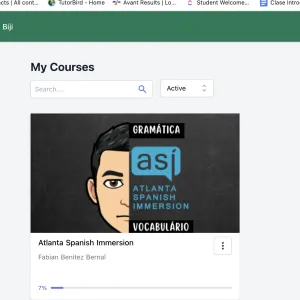
Why use Kiwify?
- Build habits: 10–20 focused minutes between classes goes a long way.
- Learn at your pace: Rewatch tricky topics anytime.
- Arrive prepared: Lessons align with ASI’s methodology so your live classes flow faster.
- Track progress: Check off modules as you complete them.
How to Access Kiwify (Student Guide)
1) Watch for the invite email
- You’ll receive an email invite to Kiwify (check Spam/Promotions if you don’t see it).
- Open the email and click Access / Activate.
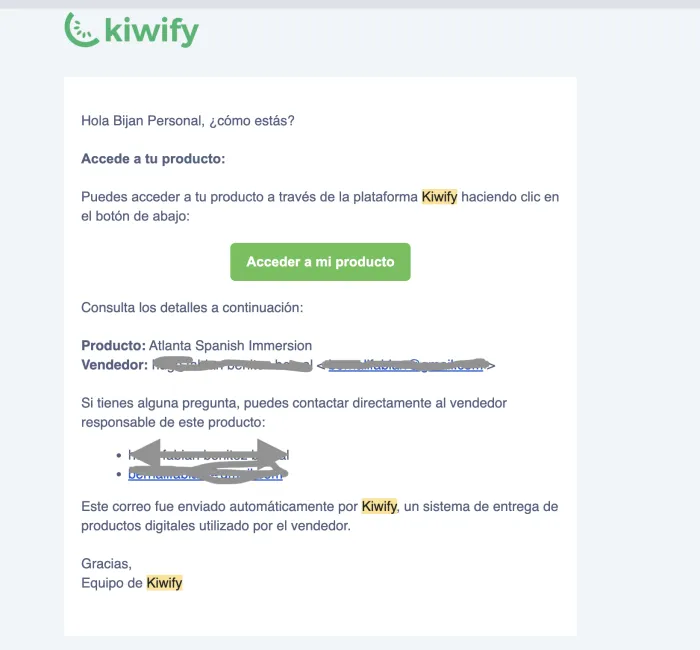
2) Create your password
- Follow the link to set a new password for your Kiwify account.
- Save it somewhere safe—you’ll use this to log in.
3) Log in and start your lessons
- After creating your password, log in via the link in the email.
- Open your course and watch the assigned videos.
- Mark lessons as complete as you go (if the option appears).
4) Access PDFs & resources
- PDFs/handouts are in the Resources/Attachments area of each lesson.
- If a PDF opens in Google Drive (or similar), sign in with your email address.
- Note: This Google/Drive sign-in is separate from your Kiwify password—this is normal.
5) Updates from your teachers
- Teachers will be able to see what you have completed in the platform.
How Kiwify + TutorBird Work Together
- Kiwify = your asynchronous study (videos, PDFs, quick practice).
- TutorBird = your live classes (scheduling, credits, teacher notes).
- Your teachers see your progress and notes, so each live class picks up <strong”>exactly where you left off.
What to do each week (simple routine)
- Before class (10–20 min): Watch the assigned Kiwify lesson + skim the PDF.
- After class (10 min): Rewatch the toughest part + add 3–5 new phrases to your “can say” list.
- End of week (10 min): Quick review quiz or shadowing exercise.
Best Practices for Success
- Use headphones and practice out loud for pronunciation.
- Shadow (repeat after the speaker) to build speaking confidence.
- Keep a phrase bank (Notes app or notebook) of sentences you can already say.
- Small, frequent sessions beat long cram sessions.
- If something feels hard, rewatch once, then bring questions to your next live class.
Quick Troubleshooting
- Didn’t get the invite?
Check Spam/Promotions and search “Kiwify.” - Forgot password?
Use Forgot Password on the Kiwify login page. - PDF says “request access”?
Make sure you’re signed into Google/Drive with the same email we have on file. - Still stuck?
Email hola@atlantaspanish.com and we’ll help right away.
FAQ
Do I have to finish every Kiwify lesson before class?
Not always—but completing the assigned module(s) before your live class helps you get the most out of your time with the teacher. Do not stress if you were not able to do the homework or teacher will meet you where you are at regardless!
I’m between levels. Which course should I open?
Start with the lower of the two levels for confidence and speed, then move up. Your teacher can confirm after your next live session.
Can I use Kiwify on my phone?
Yes. A laptop is best for PDFs, but mobile works great for videos and quick reviews.
How much time should I spend per week?
Aim for 30–60 minutes total outside of class, broken into small sessions.
Technical Tips
- Use Chrome or Safari on a stable internet connection.
- If a video won’t play, refresh the page or try an incognito/private window.
- Turn on email notifications in your Kiwify profile.
Next Steps
- Look for your Kiwify invite email.
- Set your password and log in.
- Complete this week’s assigned module before your next live class on TutorBird.
Do not hestiate to let us know if you have any questions by emailing hola@atlantaspanish.com or if you would like to see a lesson regarding a specific topic
¡Muchas gracias!
Recent Blogs

Uncategorized
Understanding The Enrollment Process & Payment Options with Atlanta Spanish Immersion
Your Spanish learning is flexible, clear, and fully supported with simple installment options and 12 months to complete your lessons.
Uncategorized
Why We Started Using TutorBird at ASI
We now use TutorBird to streamline Spanish classes, making scheduling, tracking, and learning easier than ever.
Uncategorized
Flexible Hybrid Learning: Online & In-Person Spanish Classes around Metro-Atlanta
At our Spanish school, you have the flexibility to convert your 1-on-1 Online Spanish Classes to 1-on-1 In-Person Spanish Classes, based on the package of hours you choose.